Table of Contents
Clear Cookies
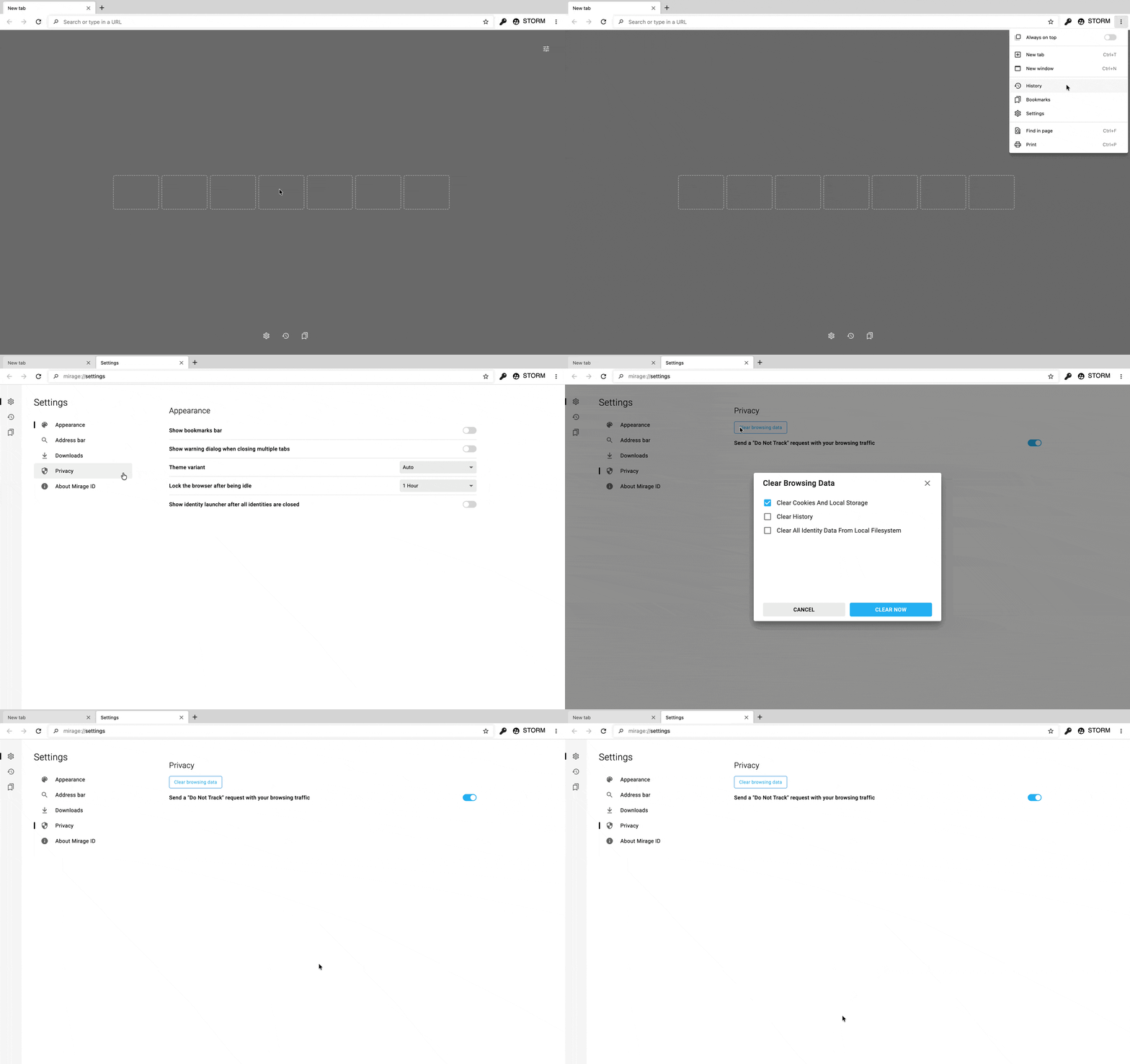
how to clear the cache and cookies in the browserThere are two ways to clear your cookies in the MirageID browser. Which one you need to use will depend on whether you have Cookie Sync enabled. See here to make that determination. If you are not using Cookie Sync, then you can clear your cookies by clicking on the 3-dot menu -> Settings -> Privacy and then click "Clear browsing data": If you are using Cookie Sync, then you will need to clear your cookies centrally. Follow these steps:Navigate to https://account.mirageid.com in any web browser and go to the Identities tab on the left sidebarClick on the gear icon in the top left of the card for the Identity whose cookies you want to clear Click on the "Clear Cookies" Link, and click Save Cookies will now be cleared for all users of that Identity.
Table of Contents
Clear Cookies
You can clear your cookies by clicking on the 3-dot menu -> Settings -> Privacy and then click "Clear browsing data":
How did we do?
Using Identities